
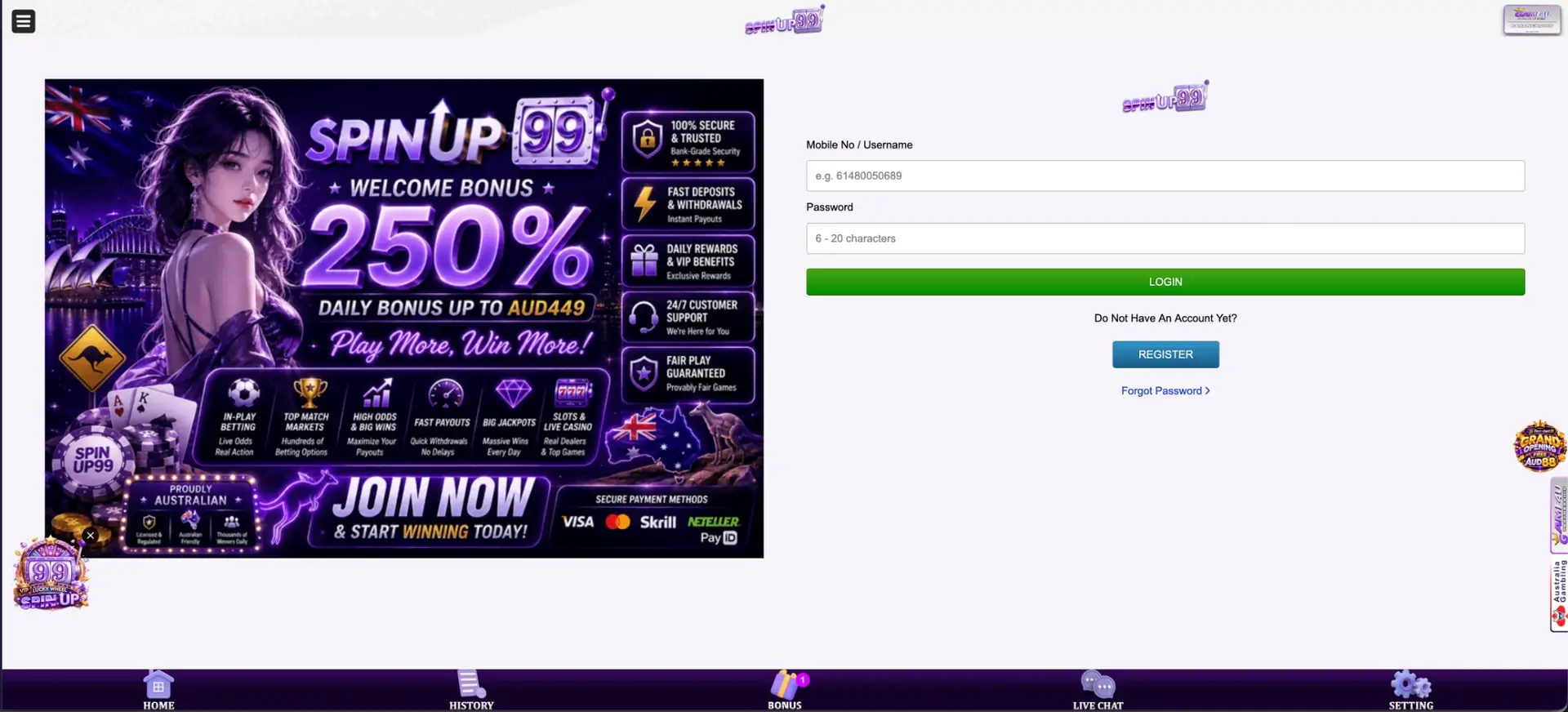
SpinUp99 login uses a mobile number or username and a password of 6-20 characters. Open the site, press LOGIN in the account panel, enter the number in international format (for example 61480050689) and the password, then press the green LOGIN button. A forgotten password is reset with the Forgot Password link under the form, and Live Chat in the bottom bar helps around the clock. If the site does not open, it may have been blocked in Australia, as described in the troubleshooting section below.
Once signed in, the account panel shows the AUD balance, the daily check-in calendar, the referral block and the Bonus page with every claimable offer. The History tab records deposits, withdrawals and bonuses for reference.
| Login essentials | Details |
|---|---|
| Where to log in | LOGIN button in the account panel or on the login page |
| Login ID | Mobile number or username |
| Mobile number format | International, starting with 61 (e.g. 61480050689) |
| Password | 6-20 characters |
| Password reset | Forgot Password link |
| Registration check | SMS verification code |
| Devices | Desktop, mobile browser, Android app |
| Currency | AUD |
| If the site does not open | Possible ACMA block in Australia |
| Support | Live Chat, 24 hours a day |
How to log in to SpinUp99
The login page shows the form on the right and a banner on the left with the welcome bonus of 250%, the daily bonus up to AUD 449 and the main features of the site.
Step-by-step login
The process takes a few seconds.
- Open the SpinUp99 site in a browser or the Android app.
- Press LOGIN in the account panel on the right.
- In Mobile No / Username, enter the mobile number used at registration in the format 614XXXXXXXX, or the username.
- Enter the password (6-20 characters).
- Press the green LOGIN button.
Getting the mobile number format right
The most common login mistake is the number format. SpinUp99 uses the international format without the plus sign and without the leading zero of the mobile number.
| How the number is usually written | How to enter it at SpinUp99 |
|---|---|
| 0480 050 689 | 61480050689 |
| +61 480 050 689 | 61480050689 |
| 0412 345 678 | 61412345678 |
No account yet? Registering at SpinUp99
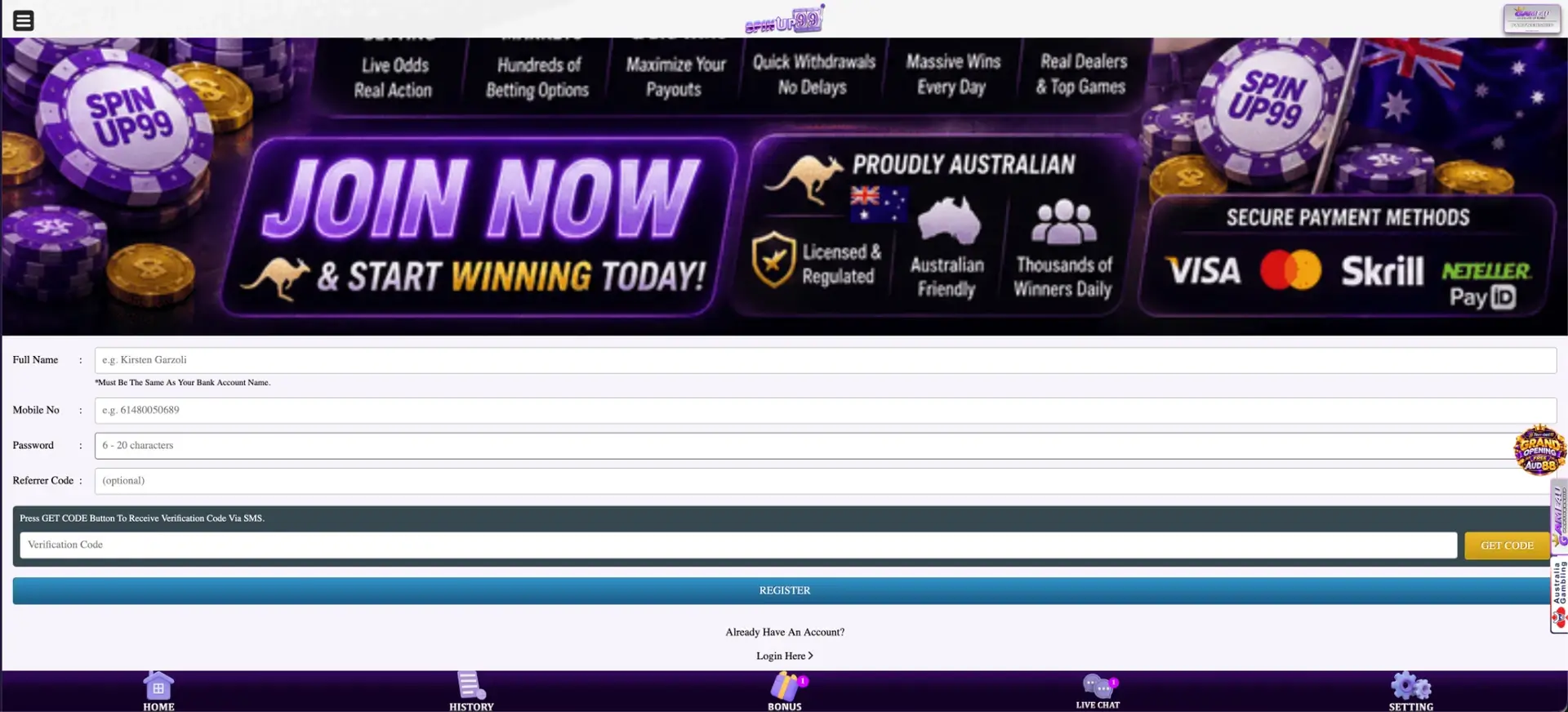
Below the login form there is a line "Do Not Have An Account Yet?" and a blue REGISTER button. Registration is linked to a mobile number and verified by SMS.
Registration steps
Five fields and an SMS code are needed.
- Enter the Full Name exactly as on the bank account; this is required for withdrawals.
- Enter the Mobile No in the 61 format.
- Create a Password of 6-20 characters.
- Add a Referrer Code if a friend shared one (optional).
- Press GET CODE, enter the SMS code in Verification Code, then press REGISTER.
After registration, the New Register bonus of AUD 69 can be claimed on the Bonus page. The "Login Here" link under the form returns to the login page.
Secure login practices
Account security depends largely on the password and the phone.
- Use a password that is not used on other sites; 6 characters is the minimum, but longer is safer.
- Mix letters and numbers within the 20-character limit.
- Keep the phone locked, since the mobile number is the login ID.
- Never share the SMS verification code with anyone, including people claiming to be support.
- Log out on shared devices.
- Do not enter login details on look-alike pages found through unknown links.
Password recovery
The Forgot Password link sits under the REGISTER button on the login page. Since the account is tied to a mobile number, the reset is usually confirmed through that number.
Reset steps
The usual sequence is short.
- Press Forgot Password.
- Enter the registered mobile number.
- Confirm with the code sent by SMS.
- Set a new password of 6-20 characters.
- Return to the login form and sign in.
If the SMS does not arrive, check that the number is in the 61 format and that the phone has signal. Live Chat can reset access if the number has changed.
Mobile login
On a phone, the login form stacks under the banner, and the bottom bar with Home, History, Bonus, Live Chat and Setting stays visible. The Android app keeps the session, so after the first login it opens straight into the account.
Tips for mobile
A few settings make mobile login quicker.
- Let the browser save the password.
- Add the site to the home screen to avoid searching for it each time.
- Install the Android app for a faster login and the AUD 19 app bonus.
Troubleshooting SpinUp99 login errors
Most problems have a simple cause.
Wrong number or password
Check the 61 format, without the leading zero or plus sign. Passwords are case-sensitive. If unsure, use Forgot Password.
The site does not open
ACMA can ask Australian internet providers to block prohibited online casino services. If SpinUp99 will not load, a block or a domain change is one possible reason. Addresses offered by unknown sources may be copies of the site and should not receive login details.
Browser or cache problems
If the form does not respond, the browser is usually the cause.
- Clear cookies and cache, then reload.
- Turn off ad blockers for the site.
- Try another browser or a private window.
SMS code not received
Wait a minute before pressing GET CODE again, check the number format and signal, and contact Live Chat if the code still does not arrive.
Account locked
Repeated wrong passwords or a duplicate account can lock access. Live Chat can explain the reason and unlock the account where possible.
What is available after login
Signing in opens every personal section of the site.
- Balance and Redeem - the AUD balance and reward redemption.
- Check In - the Day 1-7 calendar for daily rewards.
- Invite friends - the referral link and earnings.
- Bonus - New Register AUD 69, Welcome I and II, daily slot bonuses, rebate and VIP bonuses.
- Lucky Spin - the token wheel with prizes up to AUD 3,999.
- History - deposits, withdrawals and bonus records.
- Setting - account details and password change.
Account name and withdrawals
The Full Name entered at registration must match the bank account name. This is the main identity check at SpinUp99: withdrawals go to a bank account or PayID under the same name. If the name was entered incorrectly, Live Chat can advise on correcting it before the first withdrawal.
SpinUp99 login FAQ
Short answers to the most common questions.
How do I log in to SpinUp99?
Press LOGIN, enter your mobile number in the 61 format or your username, type your password and press LOGIN.
What format should my mobile number be in?
International format without the plus or leading zero, for example 61480050689.
I forgot my SpinUp99 password. What now?
Press Forgot Password, enter your mobile number and follow the SMS code to set a new password.
Why can't I open the SpinUp99 site?
The address may be blocked in Australia by ACMA, which restricts access to online casinos that are not licensed locally.
Is there a SpinUp99 login on the app?
Yes. The Android app uses the same mobile number and password.
Who can help if I still cannot log in?
Live Chat in the bottom bar, available 24 hours a day.