
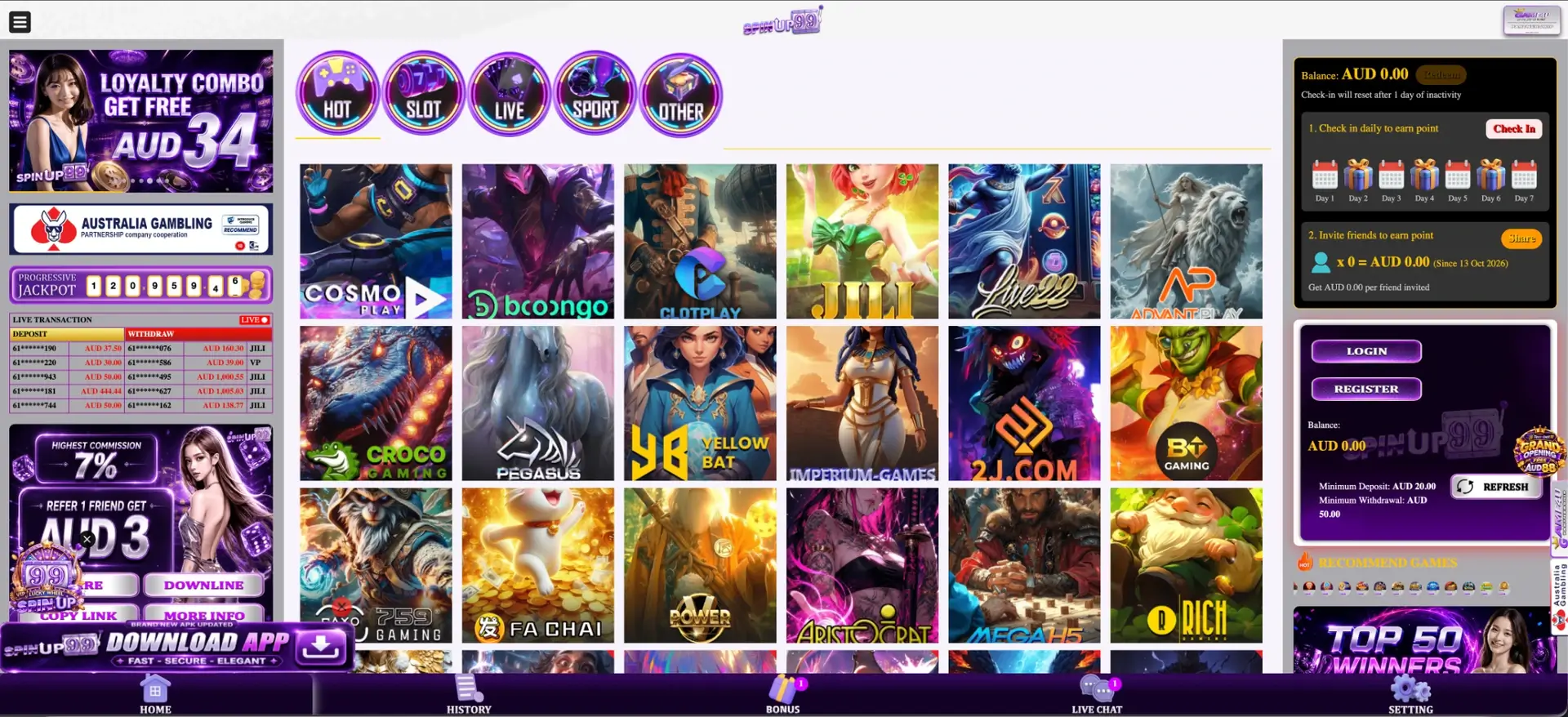
The SpinUp99 app is an Android APK downloaded from the Download App banner on the SpinUp99 site, promoted as "fast, secure, elegant" with a newly updated version. Installing it unlocks the Download App Bonus of AUD 19 in the Special For You section of the Bonus page. The app opens the same account, AUD balance, pokies, live casino, sport, daily check-in, Lucky Spin and PayID payments as the website. iPhone users can run SpinUp99 in Safari and add it to the home screen for app-style access.
The sections below explain how to install the APK safely, how to claim the app bonus, how to set up SpinUp99 on iPhone, what works on mobile, and how to keep access when the main address is blocked.
| Feature | SpinUp99 app details |
|---|---|
| Android | APK from the Download App banner |
| iPhone and iPad | Mobile site in Safari with a home screen shortcut |
| App bonus | Download App Bonus AUD 19 |
| Price | Free |
| Login | Mobile number or username and password |
| Games | Hot, Slot, Live, Sport, Other |
| Rewards | Check-in, 7% rebate, daily slot bonuses, Lucky Spin, VIP bonuses |
| Payments | PayID, Visa, Mastercard, Skrill, Neteller; deposit from AUD 20 |
| Withdrawals | From AUD 50 |
| Support | Live Chat in the bottom bar |
Is there a SpinUp99 app for Android and iPhone?
For Android, yes. The app is distributed as an APK file from the SpinUp99 site rather than through Google Play, since Google Play does not accept real-money casino apps for Australia. For iPhone, apps cannot be installed from a downloaded file, so iOS users play through Safari. A home screen shortcut makes the mobile site behave much like an app.
How to download the SpinUp99 APK
The Download App banner is at the bottom of the left column on desktop and appears on the mobile homepage.
- Open the SpinUp99 site in Chrome on the Android phone.
- Tap the Download App banner.
- Confirm the download of the APK file.
- Open the file from the notification bar or the Downloads folder.
- Allow installation from this source if Android asks.
- Tap Install, then open the app and log in with the mobile number and password.
Allowing installation from unknown sources
Android blocks apps from outside Google Play by default. On the first install, a prompt appears.
- Tap Settings in the prompt.
- Turn on Allow from this source for Chrome or the file manager.
- Go back and tap Install.
After installation, the permission can be switched off again under Settings, Apps, Special app access, Install unknown apps. Google Play Protect may warn that the app is unknown, which is normal for an APK. The file should only be downloaded from the official SpinUp99 banner or a link posted on the official Telegram channel, never from other websites.
Download App Bonus: AUD 19
The Special For You section of the Bonus page has a Download App Bonus AUD 19 card, next to Daily Free AUD 29 and the Grand Opening AUD 88 offer. To claim it:
- Install the app and log in.
- Tap Bonus in the bottom bar.
- Find the Download App Bonus card under Special For You.
- Tap Claim and read the conditions shown.
Like most free credit on the platform, the app bonus may come with a turnover requirement and a maximum withdrawal limit. These are displayed when the card is claimed.
Mobile-friendly offers worth claiming
The phone is the easiest place to keep daily streaks going. The table lists the offers that suit regular mobile check-ins.
| Offer | Amount | How often |
|---|---|---|
| Download App Bonus | AUD 19 | Once |
| Daily Free | AUD 29 | Daily, subject to conditions |
| Check-in Day 2 / 4 / 6 | AUD 8 / 15 / 25 | Each streak |
| Daily Rebate | 7% | Daily |
| Daily slot bonuses | 30 Get 30, 50 Get 50, Depo 25 & Get 31 and others | Daily |
| Lucky Spin | Up to AUD 3,999 | With tokens |
The check-in streak resets after one day of inactivity, so a phone reminder at the same time each day helps collect the full AUD 48 over six days.
SpinUp99 on iPhone and iPad
Safari runs the full mobile site. A home screen icon removes the need to type the address each time.
Adding SpinUp99 to the iPhone home screen
The option is in Safari's Share menu.
- Open the SpinUp99 site in Safari.
- Tap the Share icon at the bottom of the screen.
- Choose Add to Home Screen.
- Keep the name "SpinUp99" and tap Add.
The shortcut opens the address it was created from. If that address changes, the old icon can be removed and a new one added.
What is available in the app
The app and mobile site keep the five-button bottom bar: Home, History, Bonus, Live Chat and Setting.
- Home: the Hot, Slot, Live, Sport and Other categories, with providers such as JILI, Booongo, Live22, Cosmo Play, AdvantPlay and Fa Chai.
- Pokies: Hold and Win titles such as 4 Chili Pots, 3 Thunder Coins, 4 Clover Pots and Rhino Coins.
- Crash games: fast multiplier rounds in the Crash tab.
- Sport: in-play betting with live odds.
- Bonus: every claimable offer, VIP Program and Lucky Spin.
- History: deposits, withdrawals and bonus records.
- Live Chat: 24-hour support.
- Setting: account details and password.
Mobile payments in AUD
PayID makes mobile deposits particularly quick, since the transfer is approved in the banking app on the same phone.
| Method | How it works on mobile |
|---|---|
| PayID | Transfer to the PayID shown in the cashier from the banking app; usually arrives in seconds |
| Visa / Mastercard | Card details entered in the cashier |
| Skrill | Approval in the Skrill app |
| Neteller | Approval in the Neteller app |
The minimum deposit is AUD 20 and the minimum withdrawal AUD 50. Withdrawals go to an account under the same name as the SpinUp99 account, and their status shows in the History tab.
Official site, copies and access in Australia
SpinUp99 is not licensed in Australia, and ACMA can ask internet providers to block casino domains that are not. Because of this, sites of this type often change addresses, and copy sites appear in search results. Signs of a genuine SpinUp99 page:
- The five-button bottom bar: Home, History, Bonus, Live Chat, Setting.
- The AUD 20 minimum deposit and AUD 50 minimum withdrawal in the account panel.
- Login with a mobile number or username, never with card details.
- The Game4u Partnership line and certification logos in the footer.
An APK or page from an unknown source that differs from this should not be used.
Security on mobile
The mobile number is the login ID, so a screen lock and a unique password are the basic protection. SMS codes should never be shared. Installing the APK only from the official banner, and turning off unknown-source installs afterwards, protects the phone.
Tips for Australian players on mobile
A few habits make mobile play smoother and safer.
- Check in at the same time daily to keep the streak.
- Use PayID for instant AUD deposits.
- Read the conditions on each Claim card, especially the maximum withdrawal.
- Set a weekly budget, as the app is always at hand.
- For support with gambling, call Gambling Help Online on 1800 858 858.
SpinUp99 app FAQ
Answers to common questions about the app.
How do I download the SpinUp99 app?
Tap the Download App banner on the SpinUp99 site on an Android phone, open the APK and install it.
Is the SpinUp99 app on Google Play or the App Store?
No. Android users install the APK from the site, and iPhone users add the mobile site to the home screen.
How much is the SpinUp99 app bonus?
AUD 19, claimed from the Download App Bonus card in the Special For You section.
Is the SpinUp99 APK safe?
Download it only from the official banner or Telegram channel. Turn off unknown-source installs after setup.
Can I use PayID in the app?
Yes. PayID, Visa, Mastercard, Skrill and Neteller all work in the app.
Does SpinUp99 work on iPhone?
Yes, in Safari. Add to Home Screen creates an app-style icon.